The Ultimate Guide to Streaming on Apple Music
Published on 13.07.2023 by Sofia Novak
Do you want to know more about how Apple Music's streaming services can make it easier to access your favorite tunes? Apple Music can provide you with access to millions of songs, albums, and playlists that can be enjoyed both online and offline. Plus, it allows you to listen to music in high-definition audio quality. And the best part about it is that it’s incredibly easy to set up and use. In this guide, we’ll take you through everything you need to know about Apple Music streaming so that you can get the most out of your listening experience.
What is Apple Music?
Apple Music is a music and video streaming service developed by Apple Inc., first launched in June 2015 and now available in over 150 countries worldwide. The service allows users to stream millions of songs, watch music videos, create custom playlists, share music with friends, and listen to curated radio stations. Apple Music also integrates with Siri, allowing users to control the music with their voice. Features on Apple Music include:
- Millions of songs to stream and download
- Creating custom playlists easily
- Listening to curated radio stations
- Watching music videos from around the world
- Sharing your favorite music with friends and family
- Controlling your music with your voice using Siri
- Listening offline and save data with the “Download” feature
- Getting personalized recommendations based on your listening history.
Apple Music works on all Apple devices, including iPhone, iPad, Mac and Apple TV, and there is also an app for Android. New users can usually try it for free first, but the length of the trial depends on Apple's current offer. After that, you pick an individual, student or family plan. A family plan lets up to six people use Apple Music, each with their own account.
How does Apple Music Differ from Services like Spotify, Tidal, & Others?
Apple Music offers subscribers access to over 100 million songs, as well as ad-free radio stations. It differs from other services like Spotify, Tidal, and others in a few ways:
- Content: offers one of the largest selection of music available with more than 100 million tracks. It also includes music videos, exclusive artist content, and more.
- Radio: offers ad-free radio stations such as Apple Music 1, which used to be called Beats 1, and other curated stations.
- Curated Playlists: has several human-curated playlists to help users find the perfect tunes for any occasion.
- Social Features: allows users to follow their favorite artists, see what their friends are listening too and create collaborative playlists.
- Siri Integration: subscribers can use Siri on their iPhone or iPad to control playback of music and access exclusive features like Up Next.
- Price: costs about the same as the other big streaming services, and there are student and family plans.
Apple Music Streaming To Get The Most Out Of Your Subscription
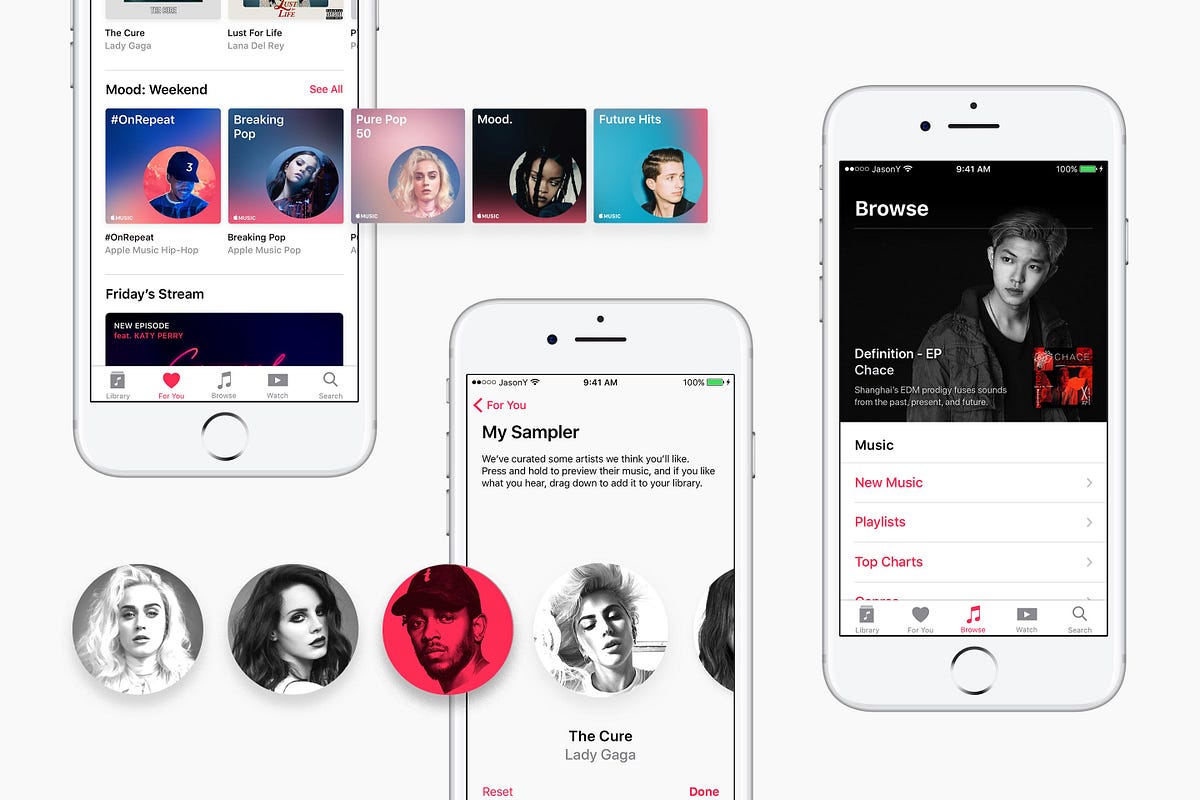
Apple Music is the perfect streaming service for any music fan. With a subscription, users can explore a vast library of over 100 million songs, albums and playlists from around the world and enjoy personalized recommendations tailored to their own unique tastes.
Getting Started
- Subscription: Apple Music streaming requires a monthly subscription in order to access the service. It's available for both individuals and families, so you can choose the plan that best fits your needs.
- Compatibility: It works on iPhones, iPads, Macs, Apple Watches and Apple TVs, and on Android phones and tablets through the Apple Music app.
Exploring the Interface
- Library: Your Library contains all of the music you’ve added to Apple Music, including your own personal collection, any songs you have purchased from iTunes, and playlists that you create yourself.
- Home: This tab (called For You and later Listen Now in older versions) offers personalized recommendations and mixes. It includes new releases picked for you, artist playlists that match your taste and other suggestions based on what you already listen to.
- Browse: Here you can explore all of the music available on Apple Music. You can browse by genre or select from curated playlists created by music experts.
- Radio: The Radio tab allows you to listen to playlists featuring live radio shows hosted by DJs. You can also tune in directly to various stations from around the world, each with its own unique style of music.
Finding and Playing Music
- Search: In addition to exploring the Browse tab, Apple Music also makes it easy to search for specific songs, albums, and artists. You can type in the name of an artist or song and Apple Music will do the rest.
- Playlists: Ready-made playlists are available in the Browse tab as well as your Library. These curated lists are based on popular genres like dance music, hip hop, EDM, and more. You can even create your own custom playlists by adding any combination of songs from your Library or those found through searching.
- Albums and Songs: The Albums tab lists all of the music currently featured on the platform, making it easy to discover new releases or revisit classic works. You can also browse individual songs by their title or artist if you’re looking for something specific.
- Siri Integration: Apple Music also integrates with Siri, allowing you to access your music hands-free. You can ask Siri to play a particular artist, genre, or playlist and she will oblige.
Personalization and Discovery
- Favorites: Tap the star (the heart in older versions) to add a song to your Favorites. Apple Music uses your favorites to improve your recommendations.
- Personal Recommendations: The Home tab offers recommendations based on the music you already listen to. You'll find new artists as well as old favorites, all picked for your taste.
- Music Videos: Apple Music also features a selection of music videos from both popular and up-and-coming artists. Here you can watch the latest clips and discover new talent that aligns with what you’re into.
- Artist Pages: If you’re interested in learning more about a particular artist, Apple Music has an Artist Page for each one. These pages feature news, interviews, concert dates, discographies and more - giving you a great way to dive deeper into their work.
Offline Listening
- Downloading Music: With Apple Music Streaming, you can easily download songs or playlists to listen offline. This means you can enjoy your favorite music wherever you go - even if you don’t have an internet connection.
- Automatic Downloads: You can also set Apple Music to automatically download songs or playlists that you add to your Library. This is a great way to ensure that the music you love is always available, regardless of whether you have access to the internet.
Sharing and Social Features
- Sharing: You can easily share any song, album, playlist or artist page with friends via text message, email, social media or AirDrop. This makes it simple for others to discover new music from the same artists that you already listen to.
- Friends Mix: The Friends Mix feature creates a personalized mix of songs based on what your friends are listening to. This is a great way to discover new music that you wouldn’t have found otherwise.
- Family Sharing: With a family plan, up to six people can use Apple Music. Everyone gets their own library and recommendations, and you can still share playlists with each other.
Wrapping Up
Now that you’ve read through our guide to Apple Music streaming, you are well-equipped to take advantage of all the features and benefits this popular music platform has to offer. With its extensive library of more than 100 million songs, curated playlists, and radio stations from around the world, Apple Music makes it easy for you to find the perfect music to fit your mood. Plus, with its powerful sharing capabilities, you can easily connect with friends and family to share your favorite tunes.